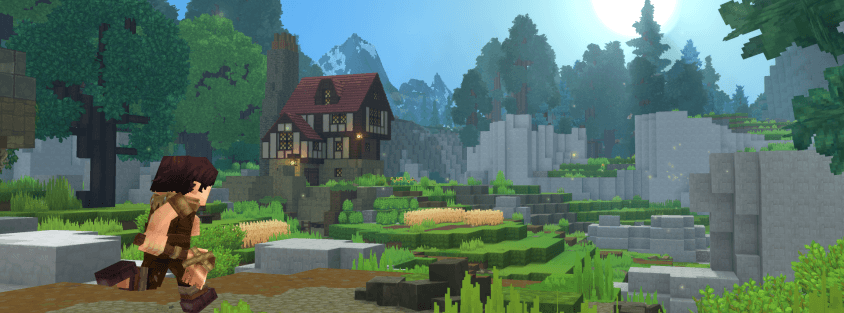
You drop into Orbis with nothing — no tools, no map markers, no tutorial popup walking you through what matters. Most beginner guides for Hytale just port over Minecraft habits that don't actually apply here, and one of them can quietly cost you your first two hours of progress. This guide covers what actually matters in your first play session: what to craft first, the one system you need to activate before you explore, and how to survive long enough to get comfortable.
Your First Ten Minutes: What to Craft First
If you're coming from Minecraft, the instinct is to punch a tree first. Don't — Hytale's crude tools run on different materials entirely:
- Plant Fiber comes from leafy bushes and berry shrubs, not grass. Hit them bare-handed and they drop fiber, occasionally with berries attached.
- Rubble comes from loose rocks and gravel-looking patches on the ground — punch those instead of mining stone outright.
- Sticks drop from smaller plants and brush scattered around most starting biomes.
With those three in hand, open your inventory with Tab to reach Pocket Crafting — you don't need a workbench yet. A Crude Hatchet, Crude Pickaxe, and Crude Sword each cost roughly 2 Rubble, 2 Plant Fiber, and 2 Sticks, and that's enough to start chopping real wood and mining stone properly. Logs and ore matter once you're past this stage, but they're not what gets you moving in minute one.
Don't Skip the Forgotten Temple
This is the single most expensive mistake new players make, and it's not obvious from anywhere in the game's UI: Hytale's Memory System — the game's core progression engine, used to record creatures and unlock new items, recipes, and teleporters — has to be manually activated, and it is not retroactive. Every creature you walk past before you turn it on simply doesn't count, and there's no way to go back and claim it later.
Activating it takes one detour before you do anything else:
- Open your map and look for the Forgotten Temple — it's marked with a distinct cross shape.
- Travel there, and craft a Crude Sword before you arrive if you haven't already — a Stone Golem guards the entrance.
- Defeat the golem and step through the portal.
- Interact with the Heart of Orbis statue inside to activate Memories.
Once it's active, simply walking within five or six blocks of a creature you haven't seen before records a Memory automatically — no attacking or killing required. Return to the Heart of Orbis periodically to submit what you've collected for rewards. Making this detour before any real exploring is the highest-value ten minutes you'll spend in your first session.
Build Shelter Before Your First Night
Hostile creatures spawn aggressively in dark areas once the sun goes down, and Hytale doesn't soften that for new players. A basic enclosed shelter — four walls, a roof, nothing fancy — is enough to keep you alive through the first night while you're still running around with crude gear. Stay close to your spawn point until you've got real tools and a weapon; wandering far before then just turns any death into a long, annoying walk back to recover your stuff.
Speaking of dying: if it happens, don't panic about losing everything permanently. Your death location is marked on your compass, so you can walk back and recover your dropped items. It's still worth making a habit of stashing anything valuable in a chest before you head out exploring, the same way you would in any survival game — a recoverable death is only convenient if you actually had somewhere safer to keep the important stuff.
Picking Your First Weapon
Once you're past crude tools, Hytale gives you six real weapon types — Dagger, Sword, Mace, Battle Axe, Shortbow, and Crossbow — each with its own stamina cost and a Signature Ability that charges as you land hits. You don't need to lock in a choice early; gear swaps freely outside combat. If you want the safest starting pick, a Sword paired with a Shield punishes fewer mistakes than the faster or heavier options while you're still learning combat timing. Our full weapons guide breaks down all six in detail once you're ready to specialize toward how you actually like to fight.
Singleplayer First, or Straight to a Server?
Either is a reasonable way to learn Hytale, but they demand different things from your PC. Singleplayer runs the full world simulation on your own machine alongside the client, which is genuinely the most demanding way to play — worth checking against Hytale's official system requirements if your hardware is on the older side. Joining a community server instead moves that simulation load onto the host's hardware, so your PC only has to render what you see.
A lot of new players actually prefer starting on a server — established communities often have spawn areas, starter kits, and other players around to ask when something isn't obvious. If that sounds appealing, our step-by-step guide to joining a Hytale server covers exactly how to connect, and what to check on a listing before you commit your time to it.
A Few Commands Worth Knowing Early
You won't need much beyond the basics at first, but two are worth memorizing immediately: press Enter to open chat, type /help to see everything available to you, and add a command name after it — like /help heal — to see that command's exact syntax. If you're playing on your own world, /heal fully restores health and stamina, handy for testing a build or recovering after a rough fight without a full respawn. Our complete commands list covers the rest once you're past the basics and want more control over your world.
The Bottom Line
Your first hour in Orbis comes down to three things: craft crude tools from Plant Fiber and Rubble instead of chasing logs, make the Forgotten Temple detour before you explore anywhere else so the Memory System actually counts your progress, and get a basic shelter up before your first night. Everything else — weapon choice, singleplayer versus multiplayer, deeper commands — can wait until you've got a safe base and some crude gear in hand.
Ready to see what other players have already built? Browse active Hytale servers on Hytale Top Servers and find a community to learn the ropes alongside, or if you're setting up your own world, list your server for free once it's ready for other players to join.